November 19, 2024

Benefits of Choosing Headless CMS for Your Next Project

When a product needs to push content to a website, a mobile app, a digital kiosk, and a third-party integration — all at once — the architecture of the system managing that content stops being a background concern and becomes a central constraint. Traditional, monolithic content management systems were built for a simpler era: one system, one frontend, one output. They couple the content repository tightly to a specific presentation layer, which works fine until the moment a team needs to go somewhere that layer was never designed to reach. That coupling is precisely what a headless CMS removes, and it's why more development teams are rethinking their stack before starting new projects rather than after.

The real question is not whether a headless CMS is technically superior in the abstract — it's whether the architectural tradeoffs it introduces actually translate into concrete advantages for the teams building and maintaining real products. Faster delivery across channels, greater flexibility for developers, and cleaner separation between editorial and engineering concerns are all frequently cited benefits, but they come with real implementation costs and organizational demands. This article examines those benefits honestly, looks at where they hold up in practice, and maps out the cases where choosing a headless approach makes genuine sense — and where it may not.
What Makes a CMS 'Headless'

A headless CMS is a content management system that separates the content repository from the presentation layer. In a traditional, coupled CMS — think WordPress or Drupal in their default configuration — the back end stores content and the templating engine renders it into HTML pages, all within the same system. That tight coupling made sense when websites were the only delivery target, but it becomes a constraint the moment a team needs to publish the same content to a mobile app, a digital kiosk, or a third-party integration.

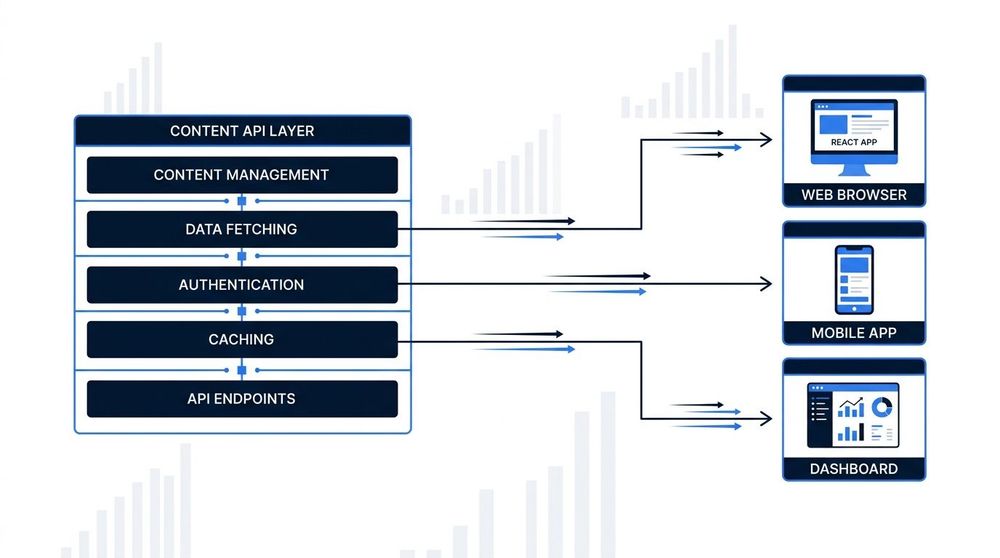
In a headless architecture, the back end still handles content creation, storage, and editorial workflows, but it exposes that content through an API — typically REST or GraphQL — rather than rendering it directly. Any client application, whether a React front end, a native iOS app, or an IoT device, can query that API and render the content however it sees fit. The CMS itself has no opinion about presentation: it manages structured content and delivers it on request, nothing more.

The contrast with a coupled CMS is not just architectural; it reflects a different assumption about where a project will end up. A coupled CMS assumes one primary front end, usually a website, built around the CMS's own templating conventions. A headless CMS assumes that content will be consumed by multiple clients with different rendering requirements, and it treats that flexibility as a first-class concern from the start. That distinction shapes almost every practical decision that follows — from how teams are organized to how quickly new channels can be added.

Image

One Repository, Many Channels

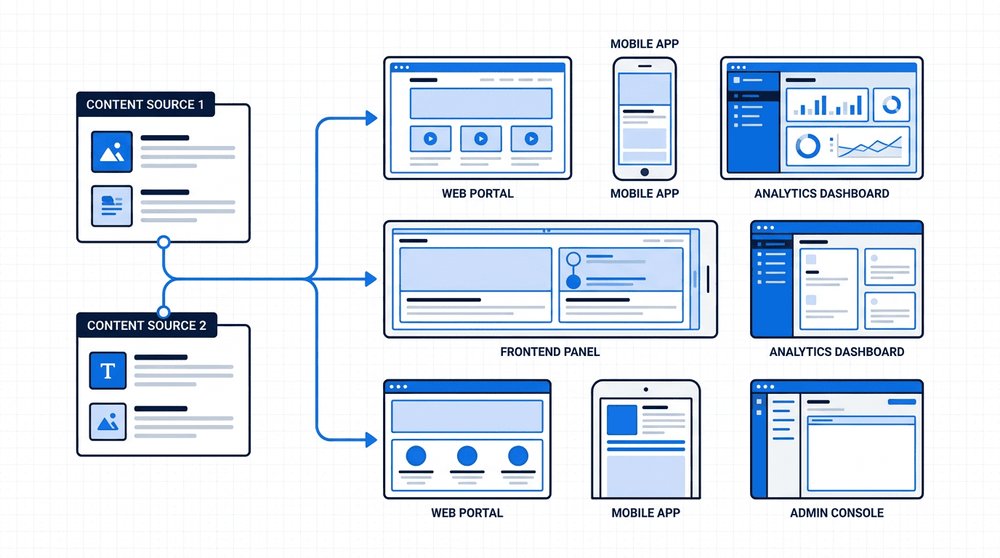
A headless CMS stores content in a single, structure-first repository — and from there, it delivers to every surface through API calls. The same article, product description, or media asset reaches a website, a mobile app, and a third-party integration in one publish action. There is no duplication, no manual re-entry, and no version drift between channels. This 'create once, publish everywhere' model is the core architectural argument for going headless on any project that targets more than one front-end.

True Omnichannel Content Delivery

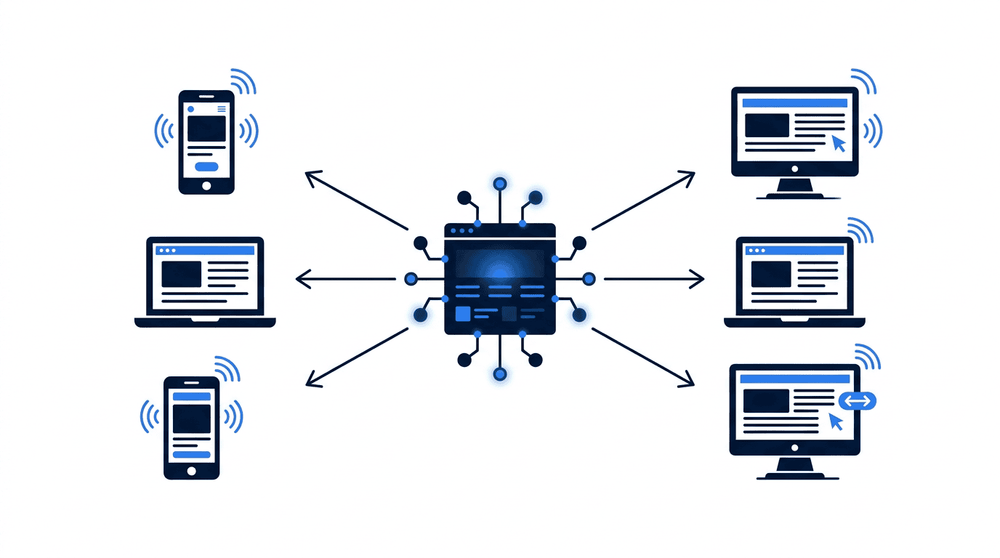
One of the most structurally significant advantages of a headless CMS is how it handles content distribution. Because the CMS stores and exposes content as structured data via an API — rather than rendering it directly into HTML pages — the same content repository can serve an entirely different set of consumers: a React web app, a Vue dashboard, a native iOS app, an Android app, a voice interface, or even an embedded display in a retail environment. No channel-specific content duplication is required. Editors write once, and every front-end pulls from the same source of truth.

This matters in practice because traditional coupled CMS architectures were built around a single delivery context: the web page. Extending them to serve a mobile app or a third-party integration typically means either scraping the rendered HTML or building workarounds that sit awkwardly on top of the original architecture. A headless CMS, by contrast, is channel-agnostic by design. The API is the product — and any client capable of making an HTTP request can consume it, regardless of what rendering technology it uses or what device it runs on.

For organizations managing content across multiple touchpoints simultaneously — a public website, a customer portal, a mobile app, and perhaps a partner-facing integration — this architecture eliminates the editorial overhead of maintaining parallel content pipelines. A product description updated once in the CMS propagates to every surface automatically. That consistency isn't just operationally convenient; it reduces the risk of content drift, where different channels gradually diverge from each other over time because they're being maintained independently.

Freedom to Choose Your Tech Stack

One of the most significant shifts a headless CMS introduces is the complete decoupling of content management from content presentation. Traditional CMS platforms — WordPress, Drupal, and their equivalents — bundle a templating engine into the system itself, which means the front-end team inherits whatever rendering constraints the platform imposes. With a headless architecture, that constraint disappears entirely: developers can build the front-end in React, Vue, Next.js, Svelte, or any other framework that best fits the project's requirements, consuming content via a standard API without the CMS having any opinion about it.

This matters more than it might initially appear. The ability to adopt static site generation (SSG) or edge rendering — techniques that dramatically improve performance and reduce server-side load — depends entirely on controlling the rendering layer. A coupled CMS that manages its own PHP or server-side templates makes these approaches difficult or impossible to implement cleanly. A headless setup, by contrast, is purpose-built for this kind of architecture: the front-end can be deployed to a CDN, pre-rendered at build time, or rendered at the edge, all without touching the CMS at all.

For development teams, the practical effect is a meaningful improvement in developer velocity. Engineers work in the frameworks and toolchains they already know, CI/CD pipelines integrate naturally with modern deployment platforms, and the CMS stops being a bottleneck when the front-end needs to evolve. Teams can upgrade or even replace their front-end entirely without migrating content — the CMS remains a stable source of truth while the presentation layer moves at its own pace.

Content free. Products move faster.

Image

Performance and Scalability Benefits

When a headless CMS powers a statically generated site, the built output is pre-rendered HTML served directly from a CDN edge node — not dynamically assembled on a server at request time. That architectural shift has a measurable impact: pages load faster because there is no database query or server-side rendering in the critical path. Under traffic spikes, the CDN absorbs the load rather than a single origin server. The result is predictable performance at scale, without provisioning more infrastructure.

A Smaller Attack Surface

One of the less-discussed but genuinely significant advantages of a headless CMS is what it does to your security posture. In a traditional CMS setup — WordPress being the canonical example — the same server that stores and manages content is also the one responding to public web traffic. That means the admin interface, the database connection, and the content delivery layer are all reachable, directly or indirectly, from the open internet. With a headless CMS, the back end is entirely decoupled from the public-facing layer: visitors interact only with a static front end or an API gateway, never with the CMS itself.

This architectural separation removes entire categories of attack vector. There is no public-facing PHP runtime to exploit, no wp-admin endpoint to brute-force, and no database port accidentally left open to the world. Content delivery is handled through purpose-built API infrastructure — CDN edge nodes, read-only content APIs — which are designed and hardened specifically for high-volume, public-facing traffic. The CMS back end, by contrast, sits behind authentication and is never part of the request path that end users touch. A successful attack on the delivery layer simply cannot reach the content management layer, because the two are not connected at runtime.

This does not mean headless CMSes are immune to security concerns — API keys can be mishandled, misconfigured access controls can expose management endpoints, and third-party integrations introduce their own risks. But the default security posture is substantially stronger than that of a traditional monolithic CMS, and the blast radius of any given vulnerability is meaningfully contained. For teams building public-facing applications where uptime and data integrity are non-negotiable, that structural reduction in attack surface is a concrete operational benefit, not just a theoretical one.

Where Headless Adds Complexity

Headless CMSes shift a meaningful amount of responsibility onto the development team. Where a traditional CMS like WordPress bundles the content layer, rendering engine, and hosting into a single deployable unit, a headless setup requires teams to manage these concerns separately. Front-end infrastructure — hosting, CDN configuration, build pipelines — must be provisioned and maintained independently, which adds operational overhead that smaller teams or time-constrained projects may underestimate when scoping out their initial architecture.

Preview environments are a particular pain point. In a coupled CMS, editors can click a preview button and immediately see how content will look on the live site, because the CMS owns the rendering layer. In a headless setup, enabling that same workflow requires building a dedicated preview environment that fetches draft content from the API and renders it through the front-end application — a non-trivial engineering task that needs to be set up, secured, and kept in sync with production. Without this investment, editors are left working without visual feedback, which can slow down content workflows and introduce errors.

Non-technical content editors often experience a steeper learning curve with headless tools. Many headless CMSes present content as structured fields in a form-based interface, which works well for developers but can feel abstract to editors accustomed to a live visual editor where they see their changes rendered in context. Some platforms have improved this with live preview panes or visual editing plugins, but it typically requires additional configuration. Teams evaluating a headless CMS should factor in the onboarding cost for editors alongside the technical benefits — the right choice depends heavily on who will be managing content day-to-day, not just how the front-end will be built.

Headless CMS vs. Traditional CMS: Side-by-Side Comparison

A direct comparison of headless and traditional CMS architectures across the attributes that most influence the choice between them.

Headless CMSTraditional (Coupled) CMS
Content deliveryVia API (REST or GraphQL) to any front-end or deviceRendered server-side and delivered as HTML pages
Front-end flexibilityFull freedom — any framework, any channelTied to the CMS's own templating system
Editor experienceStructured content fields; preview may require extra setupBuilt-in WYSIWYG editor with live preview out of the box
Security exposureReduced attack surface — no public-facing CMS layerCMS admin interface is publicly exposed by default
Scalability modelContent layer and presentation layer scale independentlyBoth layers must scale together as a single unit
Developer overheadHigher initial setup; more architectural decisions requiredLower initial setup; conventions and plugins handle most cases
Typical project fitMulti-channel products, high-traffic sites, custom front-endsBlogs, brochure sites, teams that prioritise editorial speed
Image

A Real-World Scenario

Consider a brand managing a marketing website, a companion mobile app, and a digital signage display in their retail locations. With a headless CMS, a single content editor updates a product announcement once — and that change propagates to all three surfaces immediately, without filing a ticket or waiting on a developer. The CMS acts as the single source of truth, and each front-end pulls from the same API on its own schedule. That kind of operational efficiency is exactly what makes headless a practical choice, not just an architectural one.

Choosing the Right Fit for Your Project

A headless CMS is a strong fit for projects that need to deliver content across multiple channels — a website, a mobile app, a digital kiosk, or a voice interface — from a single source of truth. Teams that want full ownership over front-end performance, including fine-grained control over rendering strategies, caching, and JavaScript payloads, also benefit significantly from the separation that a headless architecture provides. If the organisation anticipates adding new customer touchpoints over the next two to three years, building on a headless foundation now avoids a costly re-architecture later.

That said, a headless CMS is not the right tool for every situation. Small single-site projects — a company brochure, a simple blog, a landing page campaign — can be delivered faster and at lower cost with a traditional coupled CMS, where built-in themes, plugins, and an integrated editor mean fewer moving parts and less specialist knowledge required. When the development team is small or primarily non-technical, the operational overhead of managing a separate front end, a content API, and a deployment pipeline can outweigh the architectural benefits.

The honest framing is this: headless adds complexity in exchange for flexibility. That trade-off is worth making when the project genuinely needs multi-channel delivery, performance optimisation, or long-term scalability across channels. It is not worth making when the project scope is narrow, the team is lean, and a traditional CMS would ship a working product in half the time. Evaluating which side of that line a project falls on — honestly, before the architecture is locked in — is the most important decision in the process.

A headless CMS is not the right fit for every project — a simple brochure site or a small blog with a single front-end may not justify the added architectural complexity. But for projects where content must reach multiple surfaces simultaneously, where front-end performance is a genuine priority, or where the team needs the freedom to evolve the presentation layer without being constrained by the CMS itself, the separation of content management from content delivery is a meaningful architectural advantage. The ability to treat content as structured data — publishable to a web app, a mobile application, a voice interface, or any future channel through a consistent API — gives product teams a level of flexibility that tightly coupled systems simply cannot match. For organizations that expect their digital footprint to grow or change over time, headless is less a trend and more a deliberate architectural bet on adaptability.