Technologies
Capacitor

Capacitor is an open-source, cross-platform native runtime developed and maintained by the Ionic team. It allows web applications built with standard HTML, CSS, and JavaScript to be deployed as native iOS apps, native Android apps, and Progressive Web Apps (PWAs) from a single shared codebase. Rather than reimplementing native UI components in JavaScript, Capacitor provides a bridge layer that exposes native device APIs to web code, enabling access to functionality such as the camera, filesystem, geolocation, and push notifications.
Unlike older hybrid approaches that relied on a WebView as a full application container with minimal native integration, Capacitor is designed to sit closer to the native layer. It generates real native projects for iOS (Xcode) and Android (Android Studio), which developers check into version control and can extend directly with native code when needed. This architecture gives teams the flexibility to ship primarily web-based code while retaining the option to drop into Swift, Kotlin, or Java for platform-specific requirements.
Capacitor was created by the team at Ionic, the company best known for the Ionic Framework for building hybrid mobile applications. It was introduced in 2019 as a modern replacement for Apache Cordova (formerly PhoneGap), which had been the dominant native bridge for web-based mobile apps since 2009. Where Cordova accumulated years of legacy design decisions and plugin inconsistencies, Capacitor was built from scratch with contemporary mobile operating systems, ES modules, and current web standards in mind. The goal was to provide a clean, maintainable bridge between web code and native device APIs without the accumulated technical debt of its predecessor.
Rather than forking Cordova, the Ionic team made deliberate architectural choices that set Capacitor apart from the start. Capacitor treats each platform — iOS, Android, and the web — as a first-class target, generating native project files that developers check into version control and modify directly. This approach gives development teams full access to native tooling like Xcode and Android Studio, rather than hiding the native layer behind an abstraction. Capacitor also maintains backward compatibility with a large subset of Cordova plugins, easing migration for teams transitioning from the older toolchain.
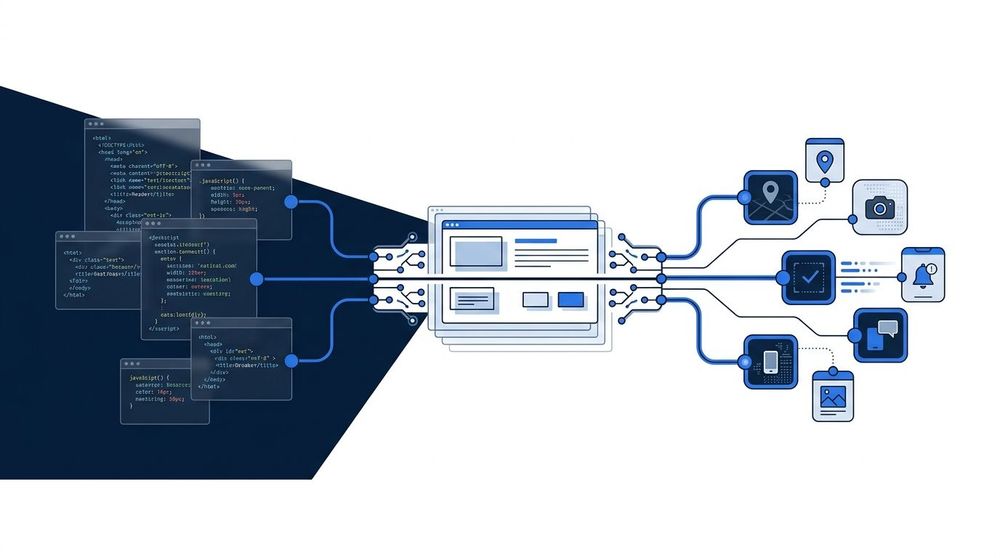
Capacitor sits as a thin runtime layer between a web application and the underlying device platform. The JavaScript layer communicates with Capacitor's bridge, which translates calls into native iOS or Android API invocations. This separation keeps the web code platform-agnostic while still granting access to device hardware such as the camera, file system, and geolocation. Each platform plugin implements the same interface, so the web layer interacts with a consistent API regardless of the target OS.
At runtime, a Capacitor application loads its web assets — HTML, CSS, and JavaScript — inside a native WebView component provided by the host operating system: WKWebView on iOS and a Chromium-based WebView on Android. The web layer runs exactly as it would in a browser, meaning the same JavaScript code executes consistently across platforms without modification. To reach native device capabilities that lie outside the browser sandbox — camera, filesystem, Bluetooth, geolocation — Capacitor exposes a native bridge, a communication channel that allows JavaScript running inside the WebView to invoke native code on the host OS. This bridge handles serialization of data between the two environments, translating JavaScript calls into native method invocations and returning results asynchronously back to the web layer.
Native functionality is packaged and exposed through plugins, which consist of two parts: a JavaScript interface that web code calls directly, and a native implementation written in Swift/Objective-C for iOS or Kotlin/Java for Android. Capacitor ships a set of official core plugins covering common use cases such as Camera, Filesystem, Haptics, and Network, while the broader community contributes additional plugins through the Capacitor Community organization and individual packages. When JavaScript calls a plugin method, the bridge serializes the arguments, dispatches the call to the native layer, executes the platform-specific code, and resolves the returned promise in the web context. This model keeps the web application code largely agnostic of the underlying platform while still enabling deep integration with native APIs.
One of Capacitor's most significant strengths is its web-first development model. Developers build the application primarily as a standard web project, using whichever framework they prefer—React, Vue, Angular, or plain JavaScript—and Capacitor handles the packaging and deployment to native platforms. This means existing web development skills transfer directly, and a single codebase can target iOS, Android, and the web simultaneously, reducing both development time and long-term maintenance overhead.
Capacitor also provides direct access to native device APIs through a consistent JavaScript interface, allowing web applications to use features like the camera, filesystem, geolocation, and push notifications without requiring platform-specific code. Another practical advantage is its compatibility with the existing Cordova plugin ecosystem. Teams migrating from Cordova can continue using established plugins while gradually adopting Capacitor's own plugin model, which lowers the cost of moving away from legacy tooling.
The primary limitation of Capacitor is its reliance on a WebView to render the application UI. For most applications—forms, content browsers, dashboards, and e-commerce—WebView performance is adequate. However, applications that demand high-frame-rate animations, complex graphics, or intensive touch interactions may encounter visible performance gaps compared to fully native implementations. This is an inherent constraint of the hybrid approach, not a deficiency specific to Capacitor.
The plugin ecosystem, while growing, is less mature than Cordova's long-established library of community plugins. Some device capabilities may lack an official or well-maintained Capacitor plugin, requiring teams to either write a custom native plugin or rely on community-maintained alternatives of varying quality. Developers should audit plugin availability for their target features early in a project to avoid late-stage surprises.
Comparison of Capacitor, Cordova, and React Native across architecture, compatibility, performance, and ecosystem criteria.
Capacitor is a practical fit for teams that already maintain a web application and want to extend their reach to iOS and Android without rewriting the codebase. Because Capacitor wraps a standard web app in a native shell, an existing React, Angular, or Vue project can be packaged as a mobile app with relatively modest changes to the existing code. This approach works well for internal tools, customer portals, and content-driven applications where the full depth of native UI is less important than rapid deployment across platforms.
It also suits product teams that want to ship and maintain a single codebase across web, iOS, and Android simultaneously. By centralizing logic in web technologies, these teams can rely on their existing JavaScript or TypeScript expertise instead of building out separate iOS and Android skill sets. For organizations where web developers outnumber native mobile specialists, Capacitor lowers the barrier to mobile delivery while still allowing access to device capabilities—such as the camera, geolocation, or push notifications—through its plugin system.
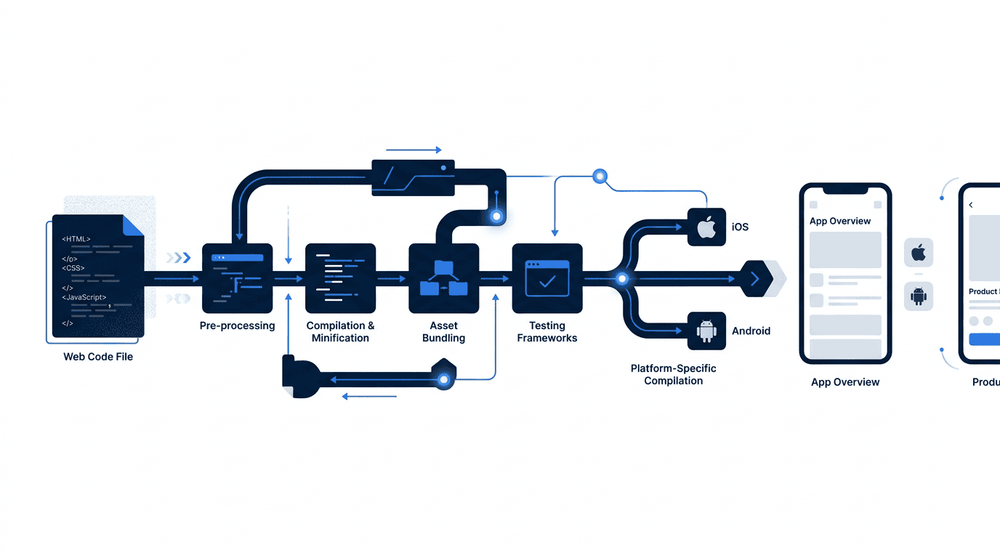
The Capacitor development workflow follows a consistent three-step pattern. A developer writes standard web code using any framework, then runs the Capacitor CLI sync command to copy the built output into the native iOS and Android project directories. From there, Xcode and Android Studio handle the final compilation and deployment steps, treating the web layer as a first-class native asset. This keeps the pipeline predictable and familiar to web developers without requiring deep native toolchain expertise.
Capacitor occupies a well-defined niche in the cross-platform development landscape: it gives web developers a straightforward path to deploying their existing HTML, CSS, and JavaScript applications as native iOS and Android apps, without requiring a full rewrite in a platform-specific language. By wrapping a web view and exposing native device APIs through a consistent JavaScript interface, it trades raw performance for development speed and code reuse. This makes it a pragmatic choice for teams whose primary expertise lies in web technologies and whose applications do not demand the graphics throughput or system-level access that fully native code provides.
Where native development or alternatives such as React Native and Flutter may be preferable depends largely on the requirements of the project. Applications with demanding animations, heavy computation, or deep OS integration are better served by approaches that compile closer to native code or eliminate the web view entirely. Capacitor, however, remains a strong fit for content-driven apps, internal tooling, and progressive web apps that need an app-store presence — contexts where the web platform's capabilities are sufficient and the cost of maintaining separate native codebases outweighs the performance difference.