Technologies
Figma

Figma is a browser-based interface design tool used primarily for creating user interface and user experience (UI/UX) designs, interactive prototypes, and shared design systems. Unlike traditional desktop design applications, Figma runs entirely in the browser and stores files in the cloud, which means teams can open, edit, and comment on designs simultaneously without passing files back and forth. It was founded in 2012 by Dylan Field and Evan Wallace, and its first public release came in 2016 after several years of development focused on bringing real-time multiplayer collaboration to the design workflow.
Because Figma operates on a single shared canvas rather than local files, it bridges the gap between designers, developers, and product managers working on the same project. Designers use it to build everything from early wireframes to high-fidelity mockups and clickable prototypes, while developers can inspect design specifications and export assets directly from the same file. Its component and design system capabilities allow teams to define reusable UI elements — such as buttons, typography styles, and color tokens — and keep them consistent across an entire product.
Figma was founded in 2012 by Dylan Field and Evan Wallace, two Brown University students who met during their studies. The company launched its first public product in 2016, positioning itself as a browser-based interface design tool at a time when the design software market was dominated by desktop applications such as Adobe Illustrator and Sketch. By running entirely in the browser and storing files in the cloud, Figma removed the friction of version conflicts and file sharing that had long plagued design teams working across multiple machines.
What distinguished Figma from its early competitors was its emphasis on real-time multiplayer collaboration — multiple designers and stakeholders could work on the same file simultaneously, much like Google Docs had done for text documents. This approach gradually shifted how design teams structured their workflows, making Figma less a personal design tool and more a shared workspace. Over time the platform expanded beyond screen design to include prototyping, developer handoff, and — with the introduction of FigJam in 2021 — collaborative whiteboarding, broadening its role across product and engineering teams.
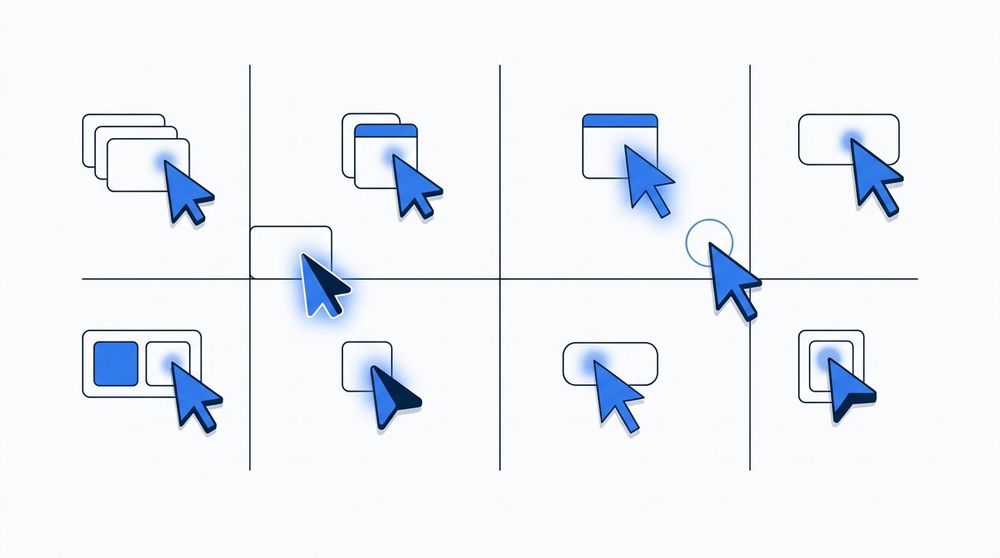
Figma's multiplayer editing model lets any number of collaborators work inside the same file at the same time. Each participant's cursor appears in a distinct color and is labeled with their name, so it is always clear who is editing what. Changes propagate instantly across all open sessions without requiring a manual save or file exchange. This architecture effectively eliminates the version-conflict problem that plagued earlier design workflows built around locally saved files.
Figma runs entirely in the browser, using a custom rendering engine built on WebGL to draw vector graphics directly on a canvas element rather than relying on the browser's native DOM layout. This architecture is what allows multiple users to view and edit the same file simultaneously without syncing conflicts, since all state is managed on Figma's servers and streamed to each connected client in real time. Design files are organized as a tree of frames, groups, and layers, where components serve as reusable building blocks: a component defined once in a library can be instantiated across many files, and updates to the source component propagate to all its instances automatically. Variants extend this system by grouping related component states—such as button sizes or interaction states—into a single component set, reducing the need to manage multiple disconnected symbols.
Alongside the component system, auto-layout allows frames and components to resize and reflow their contents according to rules similar to CSS flexbox, so a button or card adapts its dimensions when text changes rather than requiring manual adjustment. Design files and prototypes occupy the same document in Figma: designers switch between the Design and Prototype panels within a single file to define both static layouts and interactive flows, where click targets, transitions, and animations are linked directly to the layers already present in the design. This unified model means there is no separate prototyping file to keep in sync with the source design, though it also means that prototype logic is tightly coupled to the file structure and can become difficult to manage in large documents.
Figma's most widely cited advantage is its real-time collaboration capability. Multiple designers and stakeholders can work within the same file simultaneously, with changes appearing live for all participants. This eliminates the version-control problems common to desktop-based tools, where files are passed back and forth as email attachments or stored in shared drives with competing copies. For distributed teams working across time zones, the ability to leave comments, tag collaborators, and review work directly in the browser significantly reduces the overhead of the feedback cycle.
A further strength is Figma's cross-platform accessibility. Because the application runs in a web browser, designers on macOS, Windows, and Linux can all use the same tool without compatibility issues. The companion desktop app mirrors the browser experience but does not require a specific operating system, which makes onboarding straightforward in mixed-environment organizations. Figma also provides robust design system support through its shared libraries feature: components, color styles, and text styles defined in one file can be published and consumed across an entire organization, keeping product interfaces consistent at scale.
The most significant practical limitation is Figma's dependence on an internet connection. While a desktop app can cache recently opened files for limited offline viewing, full editing functionality requires connectivity. Designers working in environments with unreliable network access — on flights, in remote locations, or behind restrictive corporate firewalls — may find this a meaningful constraint. Autosave to the cloud is the default and only persistence model, which means local-first workflows are not an option.
Pricing is another consideration, particularly for smaller teams and individual contributors. Figma's free tier imposes limits on the number of projects and collaborators, and access to advanced features such as branching, analytics, and organizational controls requires paid plans. Following Figma's acquisition by Adobe in 2022 — and the subsequent regulatory scrutiny that led to the deal being abandoned in 2023 — some organizations have reconsidered long-term dependency on the platform, citing uncertainty about its future pricing model and product direction. Open-source and self-hosted alternatives have gained attention as a result, though none currently match Figma's feature set for collaborative interface design.
Comparison of leading UI/UX design tools across platform support, collaboration capabilities, and pricing model.
Figma is most widely used for product UI design, covering everything from early wireframes to polished, production-ready interface mockups for web and mobile applications. Teams use it to iterate on layouts, establish visual hierarchies, and align stakeholders around a shared design direction before any code is written. Its browser-based, multiplayer environment makes it practical for distributed teams, allowing designers, product managers, and engineers to review and comment on designs without installing dedicated software or exchanging static files.
Beyond static design, Figma is heavily used for interactive prototyping and design-to-developer handoff. Designers can link frames together with transitions and interactions to simulate user flows, which can then be shared directly with stakeholders or used in usability testing. When a design is ready for implementation, developers can inspect component properties, spacing, typography tokens, and exported assets directly within the same file, reducing the back-and-forth that traditionally slows down handoff. Organizations maintaining shared design systems also rely on Figma's component libraries and variables to ensure visual consistency across products and teams.
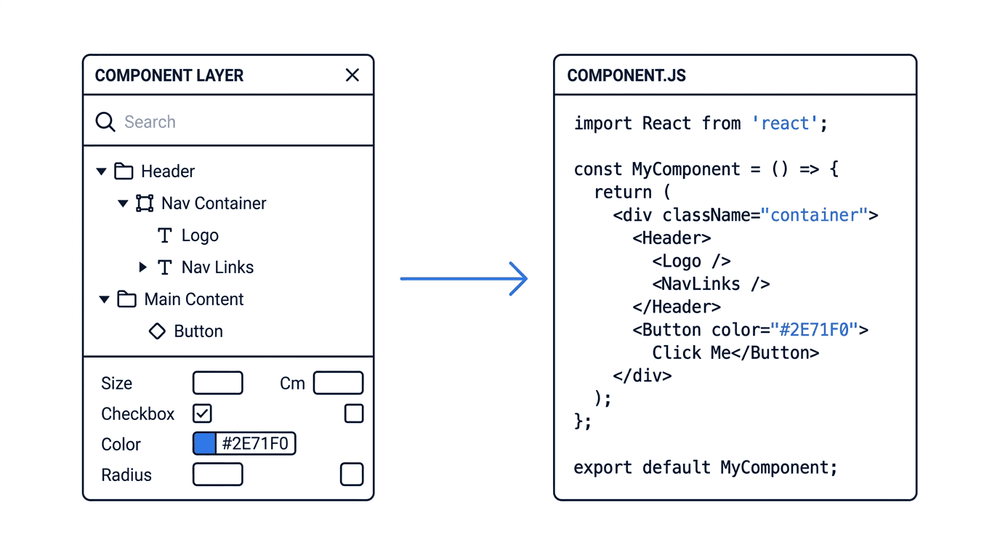
A typical Figma handoff begins with designers building reusable components in a shared library, then assembling screens from those components within a project file. Once a design is ready for development, developers open the Inspect panel to access exact measurements, spacing values, typography specs, and color tokens—without needing to ask the designer. Assets can be exported directly from Figma in formats like SVG or PNG. This workflow reduces back-and-forth between teams and keeps the source of truth in a single, versioned file.
Figma has established itself as a central tool in modern product development workflows, bridging the gap between design, engineering, and product management within a single browser-based platform. Its combination of real-time collaboration, component-driven design systems, and developer handoff capabilities addresses the coordination challenges that teams commonly face when moving from concept to shipped product. By keeping design artifacts accessible and version-controlled in one shared environment, Figma reduces the friction that traditionally accumulated at handoff points between disciplines.
As design tooling continues to evolve, Figma's position reflects a broader shift in the industry toward treating design as a collaborative, iterative practice rather than a siloed phase. The platform's integration with prototyping, accessibility annotation, and third-party development tools means that teams can manage more of the product lifecycle without switching contexts. For organizations evaluating their design infrastructure, understanding Figma's capabilities and constraints provides a clearer picture of where it fits within a given team's stack and working style.

Great products aren't built by chance — they're designed with intention. Behind every app that feels natural to use and every website that makes you smile, there's thoughtful design work happening behind the scenes. At Nebulae, we specialize in product design that brings together strategy, user experience (UX), and user interface (UI) to create digital solutions people actually want to use.

Web app design is the discipline of shaping how a browser-based application looks, behaves, and guides users through their tasks — combining visual design, interaction patterns, and information architecture into a coherent product. For businesses, getting this right is not a cosmetic concern: a well-designed web application reduces friction, shortens onboarding time, and directly affects whether users return or abandon. At Nebulae, we handle web app design as an integral part of end-to-end product development — not as a hand-off between a design agency and a dev shop, but as a single continuous process from early concepts through to a shipped, production-ready application. That means the teams doing the design and building the product are the same, so decisions made in Figma translate accurately into working code without rework or lost intent.