Technologies
Flutter

Flutter is an open-source UI toolkit developed and maintained by Google that enables developers to build natively compiled applications for mobile, web, and desktop platforms from a single codebase. It uses Dart, a statically typed, object-oriented programming language also developed by Google, as its primary language. Rather than relying on platform-native UI components, Flutter renders its own widgets using the Skia (and more recently Impeller) graphics engine, giving developers precise control over how an application looks and behaves across every target platform.
This approach means that a single Flutter project can produce applications for Android, iOS, the web, Windows, macOS, and Linux without rewriting platform-specific code for each target. The framework provides a rich set of pre-built, customizable widgets that conform to both Material Design and Apple's Cupertino guidelines, allowing teams to match platform conventions when needed or define entirely custom interfaces when not. Because the UI is compiled and drawn directly rather than bridged through platform views, Flutter applications typically achieve performance characteristics close to those of fully native implementations.
Flutter was created by Google and first previewed at the Dart Developer Summit in 2015 under the codename "Sky". The framework was designed from the outset to render UI at 60 frames per second on mobile hardware, using Google's Dart programming language rather than a JavaScript bridge. Its first stable release, Flutter 1.0, arrived in December 2018, marking its readiness for production mobile development on both Android and iOS from a single codebase.
In the years that followed, Google expanded Flutter's scope well beyond mobile. Flutter 2.0, released in March 2021, promoted web and desktop targets—including Windows, macOS, and Linux—to stable or near-stable status, repositioning the framework as a genuinely multi-platform toolkit. Flutter 3.0, released in May 2022, brought all six platforms (iOS, Android, web, Windows, macOS, and Linux) to stable support simultaneously. This progression reflects a deliberate strategy to offer a single UI codebase that compiles natively for each target platform rather than relying on a shared runtime abstraction.
At the core of Flutter's architecture is its own rendering engine, built on top of Skia (and more recently Impeller), which draws every pixel of the UI directly to the canvas rather than delegating to the host platform's native widgets. This means Flutter does not wrap iOS UIKit controls or Android Views — instead, it replicates the visual appearance of UI components entirely through its own widget tree. Every button, input field, and layout structure is a widget, and the framework composes these widgets into a tree that is traversed and rendered on each frame. Because rendering bypasses the platform's native widget system, the same visual output is produced consistently across Android, iOS, web, and desktop targets.
Flutter applications are written in Dart, a statically typed, ahead-of-time compiled language developed by Google, which allows Flutter code to be compiled to native ARM or x86 machine code before execution — avoiding the JavaScript bridge overhead that affects some other cross-platform frameworks. During development, Flutter's hot reload mechanism injects updated source code into the running Dart VM, allowing UI changes to appear in under a second without losing the current application state. This feedback loop significantly shortens iteration time, since a developer can adjust a layout or tweak a color and see the result immediately in a live simulator or connected device.
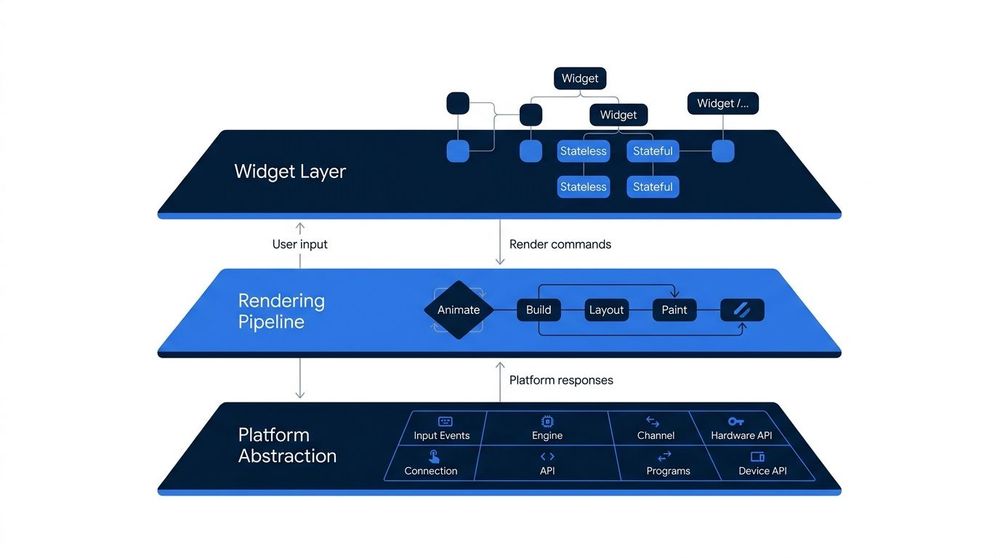
Flutter is organized into four distinct layers that work together from the ground up. At the top sits the Dart application code written by the developer. Below that, the Flutter framework provides widgets, rendering, animation, and gesture handling. The engine layer—written in C++—handles low-level graphics via Skia or Impeller, text layout, and the Dart runtime. Finally, the platform embedder integrates the engine into the host operating system, whether Android, iOS, web, or desktop.
Flutter's most significant advantage is its single codebase model. A team writes one Dart codebase and compiles it to native ARM code for Android, iOS, web, Windows, macOS, and Linux — without platform-specific branches for the vast majority of logic. This reduces duplication, lowers maintenance overhead, and means a bug fixed in one place is fixed everywhere. For teams shipping across multiple platforms simultaneously, this is a meaningful reduction in engineering cost.
The rendering architecture gives Flutter a second structural advantage. Because Flutter draws its own widgets using the Skia (and, since Flutter 3.10, Impeller) graphics engine rather than delegating to native platform components, the visual output is pixel-identical across platforms. Combined with hot reload, which pushes code changes into a running app in under a second without losing application state, the development cycle is noticeably faster than in many native or cross-platform alternatives. This tight feedback loop benefits both UI iteration and bug investigation.
Flutter's disadvantages are real and worth weighing carefully. The binary size of a Flutter app is larger than a comparable native app by default, because the framework and engine are bundled into every build. Minimum release APK sizes typically start around 4–6 MB before any application code is added, which may matter for markets with constrained storage or slow networks. The Dart language also presents an adoption curve: while Dart is approachable and well-documented, developers proficient in JavaScript, Swift, or Kotlin still need time to learn it, and the talent pool is smaller than for those more established languages.
A subtler limitation concerns platform fidelity. Because Flutter renders its own widget set, its components do not automatically inherit changes in the native platform UI (for example, a new iOS control style introduced in a new version of iOS). Flutter's Material and Cupertino widget libraries track platform conventions reasonably well, but there can be a lag, and highly platform-specific interactions — such as deep integration with system-level accessibility features or emerging OS-native widgets — may require additional work or may not be achievable at all through Flutter alone.
Comparison of Flutter, React Native, and Xamarin across key decision criteria for cross-platform mobile development.
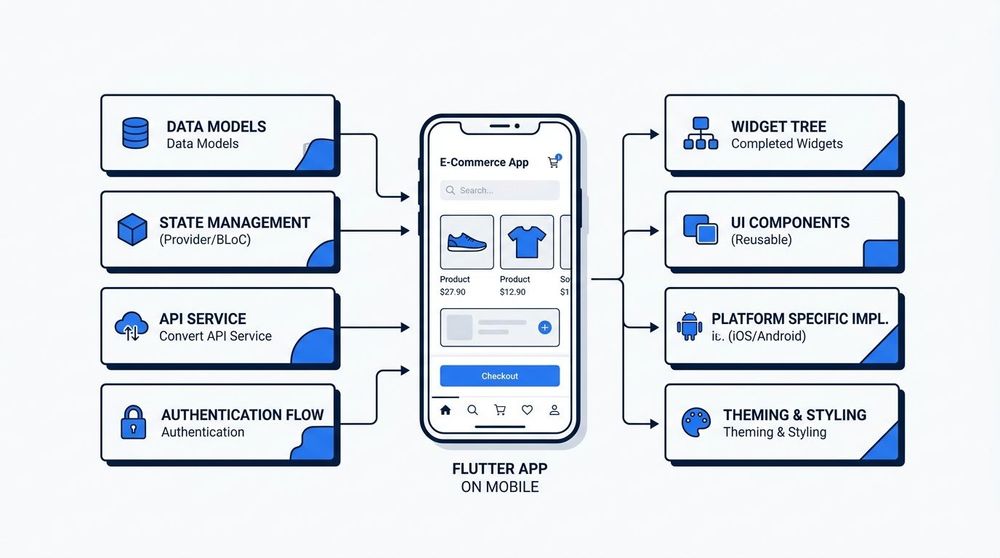
Flutter is a natural fit for teams that need to ship on iOS and Android from a single codebase without maintaining two separate projects. Startups validating ideas benefit from its fast iteration cycle, while companies building internal dashboards or tooling can target desktop and web targets from the same code. MVPs that need a polished UI quickly—without sacrificing platform reach—are a recurring use case where Flutter's unified rendering model delivers clear practical value.
Flutter's defining characteristic is its self-contained rendering engine, which bypasses native UI components entirely and draws every pixel using the Skia or Impeller graphics library. This approach gives teams precise, consistent control over visual output across Android, iOS, web, and desktop from a single codebase, making it particularly well-suited for applications where brand fidelity and cross-platform consistency are primary concerns. The tradeoff is that Flutter apps carry the weight of that engine in their binary size, and UI components do not automatically inherit the look and feel of the host platform. For projects where native platform conventions matter more than visual uniformity, this distinction is worth weighing carefully.
On the development side, Dart is a relatively small language ecosystem compared to JavaScript or Kotlin, which means the pool of experienced Flutter developers is narrower, even as it has grown steadily since Flutter's stable 1.0 release in 2018. Hot reload substantially shortens iteration cycles, and the widget composition model is expressive once learned. Teams evaluating Flutter should consider the nature of their target platforms, their tolerance for a non-native UI feel, and whether their use case — consumer app, internal tool, embedded kiosk — plays to Flutter's cross-platform strengths or demands deeper integration with platform-specific APIs.