Technologies
Ionic

Ionic is an open-source framework for building cross-platform applications — targeting mobile, web, and desktop — from a single codebase written in standard web technologies: HTML, CSS, and JavaScript. First released in 2013 by Drifty Co., Ionic was originally built on top of AngularJS and Apache Cordova, but has since evolved to support multiple frontend frameworks, including Angular, React, and Vue, as well as plain JavaScript. This flexibility has made it a widely adopted choice for teams that want to ship to both iOS and Android without maintaining two entirely separate native codebases.
At its core, Ionic provides a library of pre-built UI components — buttons, forms, navigation patterns, modals, and more — that are designed to adapt their appearance and behavior to the platform they run on, mimicking native look and feel. Under the hood, the application runs inside a WebView, a browser-rendering layer embedded in a native shell, though Ionic also supports a Capacitor-based approach that gives web apps more direct access to native device APIs such as the camera, geolocation, and push notifications. This architecture allows developers to use familiar web development workflows while still publishing to app stores.
Ionic was first released in 2013 by Drifty Co., a startup based in Madison, Wisconsin. The framework was conceived as a way to build mobile applications using familiar web technologies — HTML, CSS, and JavaScript — rather than requiring developers to learn platform-specific languages such as Swift or Kotlin. Early versions of Ionic were tightly coupled with AngularJS and relied on Apache Cordova as the bridge between web code and native device APIs, which was a common pattern for hybrid mobile development at the time.
A significant architectural shift arrived with Ionic 4, released in 2019, which rebuilt the framework's UI components as standard Web Components using the Stencil compiler. This change decoupled Ionic from any single JavaScript framework, allowing developers to use it with Angular, React, Vue, or even plain JavaScript. The move toward a framework-agnostic model broadened Ionic's appeal considerably and reflected a wider industry trend toward interoperable, standards-based component design.
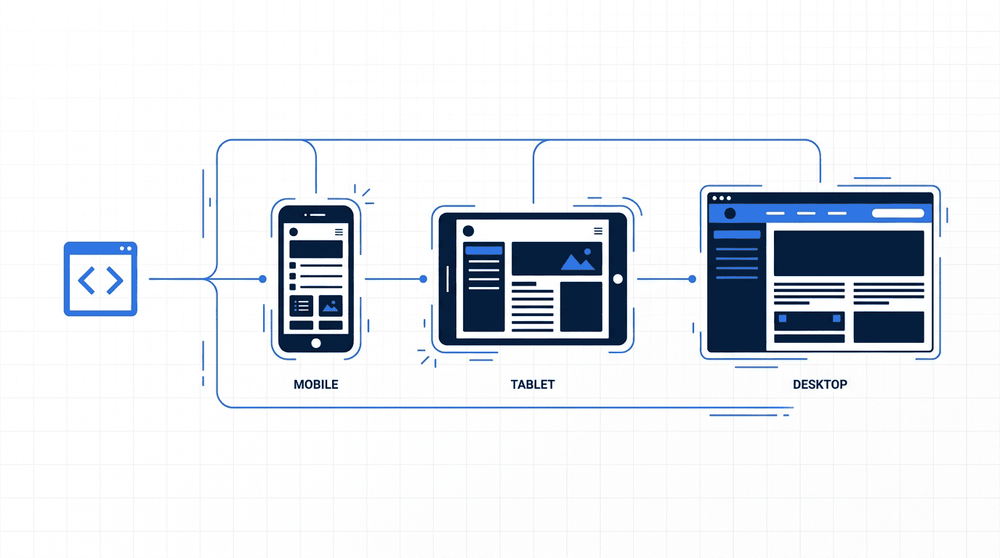
Ionic's architecture centers on a web runtime layer—HTML, CSS, and JavaScript—that runs inside a native container on iOS and Android, as well as directly in the browser. A native bridge connects the web layer to device APIs such as the camera, filesystem, and geolocation, allowing web-technology code to access platform capabilities that a standard browser tab cannot reach. This layered design means a single codebase can be compiled and deployed to all three targets without maintaining separate platform-specific codebases.
At the heart of Ionic is its UI component library, a collection of pre-built, cross-platform interface elements—buttons, modals, navigation bars, form inputs, and more—that automatically adopt the visual conventions of iOS or Android at runtime. These components are implemented as web standards-based custom elements, which means they integrate naturally into any modern JavaScript environment without requiring a framework-specific wrapper. The library is intentionally designed to feel native on each platform, so the same Ionic component renders with platform-appropriate styling whether the app is running on an iPhone or an Android device.
The native runtime bridge is provided by Capacitor, Ionic's modern successor to the earlier Apache Cordova plugin system. Capacitor wraps the web application in a native shell for iOS and Android (and also supports progressive web apps), exposing device APIs—such as the camera, filesystem, and push notifications—through a consistent JavaScript interface. On the framework side, Ionic supports Angular, React, and Vue, as well as plain JavaScript, so teams can adopt it without abandoning their existing technology preferences or developer familiarity.
One of Ionic's most significant advantages is cross-platform code reuse. A single codebase written in HTML, CSS, and JavaScript can be deployed as an iOS app, an Android app, and a Progressive Web App simultaneously. This reduces the engineering time required to maintain separate native codebases and makes Ionic an attractive choice for teams that already have web development expertise. Because the framework builds on standard web technologies, developers do not need to learn Swift, Kotlin, or separate platform-specific tooling to ship on multiple platforms.
Ionic also ships with a large, pre-built UI component library that adapts its visual style to match platform conventions — rendering Material Design on Android and iOS-styled components on Apple devices. This adaptive theming reduces the work required to produce a polished, platform-appropriate interface without designing separate component sets. The component library covers common patterns such as navigation, forms, modals, and lists, which accelerates development of standard application screens.
The principal disadvantage of Ionic is its performance ceiling. Because the UI runs inside a WebView rather than rendering through the platform's native UI layer, computationally intensive screens — such as those with complex animations, real-time data visualisation, or heavy gesture handling — can feel less responsive than their fully native equivalents. On lower-end devices, this gap is more noticeable. Applications that require frame-perfect animation or deep integration with platform graphics APIs are generally better served by a native or near-native approach.
A related limitation is the plugin ecosystem. Ionic relies on Capacitor (or the older Cordova) to bridge JavaScript calls to native device APIs. While coverage of common APIs is broad, access to newer or more obscure platform features depends on third-party plugins being available and maintained. When a required native capability lacks a stable plugin, teams must write their own native bridge code, which partially offsets the cross-platform productivity gain. Teams evaluating Ionic should audit their required device API surface early in the project to identify any gaps.
Comparison of Ionic, React Native, and Flutter across key dimensions. Each framework involves real tradeoffs depending on team skills, performance requirements, and deployment targets.

Ionic is a practical choice in three recurring scenarios: internal enterprise tools where cross-platform reach matters more than native polish, MVPs where delivering on iOS and Android simultaneously reduces time-to-market, and content-driven apps—such as news readers, portals, or catalogues—where near-native performance is sufficient. Teams that already work in Angular, React, or Vue can adopt Ionic without switching languages, which lowers the barrier to getting a first version shipped.
Ionic occupies a well-defined position in the cross-platform development landscape: it is a web-first framework that lets teams build mobile and desktop applications using standard HTML, CSS, and JavaScript, while targeting iOS, Android, and the web from a single codebase. Its deep integration with popular frameworks like Angular, React, and Vue means that web developers can enter mobile development without adopting an entirely new paradigm. For teams whose strengths lie in web technologies and whose applications are not heavily dependent on native device capabilities or raw rendering performance, Ionic represents a practical and well-supported path to multi-platform delivery.
The tradeoffs, however, deserve careful consideration before committing to the framework. Applications that require intensive graphics, complex animations, or deep access to device hardware may run into the inherent limitations of a WebView-based architecture. Startup performance and runtime behavior can differ from truly native applications, and those differences are more pronounced on lower-end devices. Teams should evaluate their specific performance requirements, the complexity of native integrations they need, and the long-term maintenance implications of a hybrid approach — only then can they make an informed decision about whether Ionic is the right tool for their project.