Technologies
Jenkins

Jenkins is an open-source automation server written in Java, designed to help development teams automate the building, testing, and deployment of software. Originally forked from the Hudson project in 2011, Jenkins has grown into one of the most widely adopted tools for implementing continuous integration (CI) and continuous delivery (CD) pipelines. It runs as a standalone application on a server and can be configured to trigger automated workflows whenever code changes are pushed to a repository.
At its core, Jenkins acts as an orchestration layer between source code repositories, build tools, test frameworks, and deployment targets. Teams define their automation logic through pipelines—either via a web-based interface or as code in a Jenkinsfile stored alongside the project source. This flexibility, combined with a large ecosystem of plugins (over 1,800 available), makes Jenkins adaptable to a wide range of technology stacks and organizational workflows.
Jenkins began its life as Hudson, a continuous integration tool created by Kohsuke Kawaguchi while working at Sun Microsystems in 2004. After Oracle acquired Sun in 2010, a dispute over the project's governance and trademark led the majority of the developer community to fork Hudson under the new name Jenkins in 2011. Kawaguchi and most of the core contributors moved to the Jenkins fork, which quickly became the de facto continuation of the project, while Hudson's development eventually stalled.
From that fork, Jenkins grew rapidly into one of the most widely adopted CI/CD (Continuous Integration and Continuous Delivery) tools in the software industry. Its open-source model, combined with an extensible plugin architecture that allows integration with a vast range of tools and platforms, helped it accumulate a large and active community. By the mid-2010s, Jenkins had established itself as a standard reference point for automated build and deployment pipelines across organisations of many sizes and industries.
Jenkins operates on a master-agent architecture (also referred to as controller-agent in more recent versions). The controller node is responsible for scheduling build jobs, dispatching tasks to agents, monitoring agent status, and presenting results through the web interface. Agents are separate processes that connect to the controller and execute the actual build steps, allowing workloads to be distributed across multiple machines or operating systems simultaneously. This separation keeps the controller lightweight and makes it straightforward to scale capacity by adding new agents without modifying the core installation.
Build logic in Jenkins is defined through pipelines, which are written in a Groovy-based domain-specific language and stored in a file called a Jenkinsfile. Pipelines can be written in either Declarative syntax, which enforces a structured, opinionated format suited to most standard workflows, or Scripted syntax, which offers the full flexibility of Groovy for complex conditional logic. Beyond pipelines, nearly every aspect of Jenkins' functionality—source control integration, notification systems, build tools, and cloud provider support—is delivered through its extensive plugin ecosystem, which currently numbers in the hundreds and is maintained by a broad open-source community.
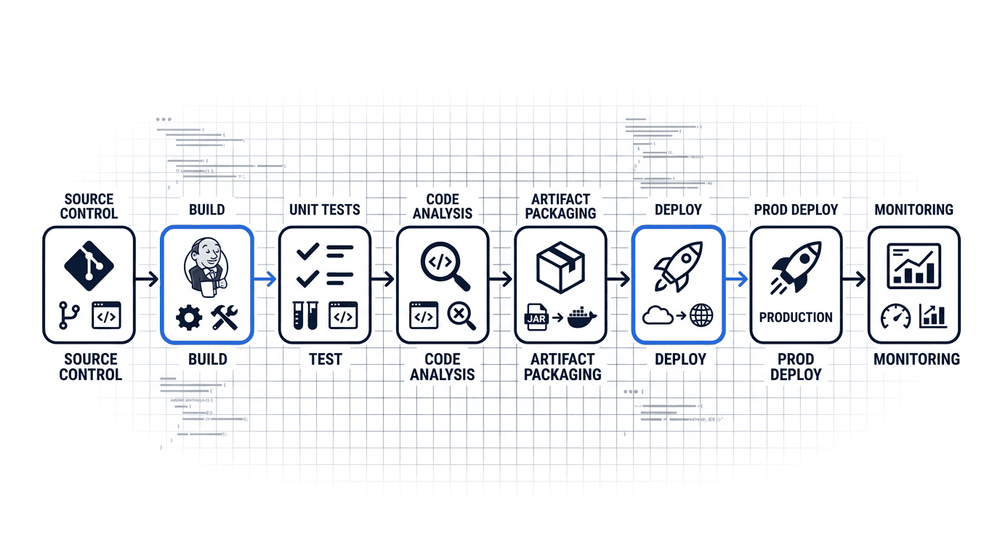
A typical Jenkins CI/CD pipeline begins when a developer pushes code to a version control system such as Git. Jenkins detects the change, triggers a build, and runs an automated test suite. If all stages pass, the pipeline advances to deployment—pushing the artifact to a staging or production environment. Each stage is defined in a Jenkinsfile, making the entire flow version-controlled alongside the application code.
One of Jenkins' most significant strengths is that it is open-source and free to use, which removes licensing costs that can be substantial with commercial CI/CD platforms. Because the source code is publicly available and governed by an active community, bugs are identified and patched regularly, and the project has remained viable for well over a decade without dependence on a single vendor.
Jenkins also benefits from one of the largest plugin ecosystems in the CI/CD space, with over 1,800 community-maintained plugins available. This breadth of integrations—covering version control systems, build tools, testing frameworks, cloud providers, and notification services—means that most toolchains can be connected to Jenkins without writing custom code. The flexibility to run Jenkins on any operating system, in a container, or on a cloud instance further adds to its adaptability across different infrastructure setups.
On the other side of the ledger, Jenkins carries a notable maintenance overhead. Administrators are responsible for managing the Jenkins server itself, keeping plugins up to date, and handling compatibility issues that arise when plugin versions diverge. In environments with many pipelines or a large plugin footprint, this operational burden can become significant, requiring dedicated time from engineering or DevOps staff.
Configuration complexity is another genuine drawback. While Jenkinsfile and pipeline-as-code practices have improved reproducibility, setting up non-trivial pipelines—particularly those involving parallel stages, shared libraries, or dynamic agents—still demands a solid understanding of Groovy and Jenkins internals. Additionally, the Jenkins web interface is widely regarded as dated compared to newer CI/CD tools, offering a less intuitive experience for teams accustomed to more modern dashboards. For organizations weighing Jenkins against newer alternatives, these operational and usability costs are worth factoring in alongside the platform's undeniable flexibility.
Comparison of Jenkins against common CI/CD alternatives across hosting model, plugin ecosystem, and ease of setup. Jenkins offers the most flexibility but demands significantly more operational effort.
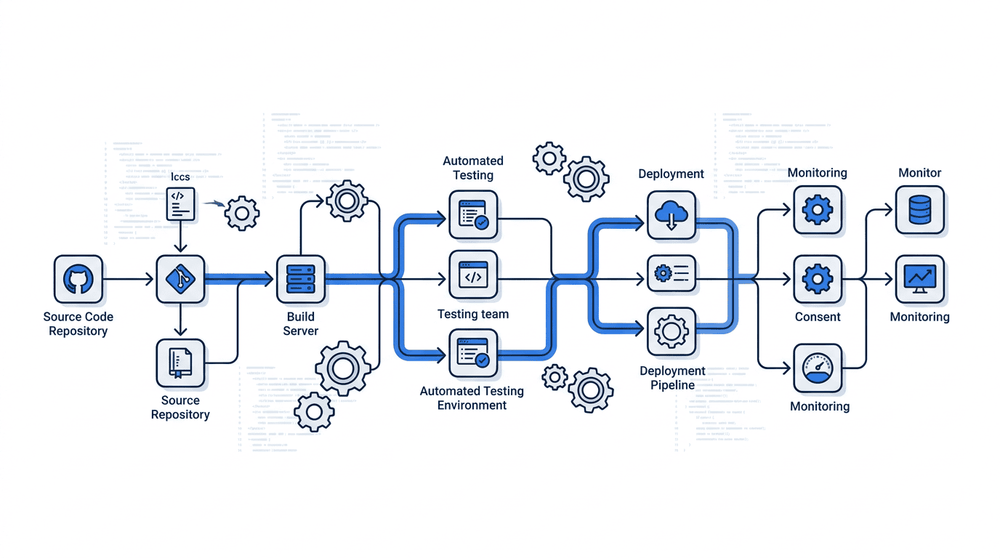
Jenkins is a common choice when a project demands flexibility that hosted CI services cannot provide—particularly for multi-stage pipelines that deploy across dev, staging, and production environments in sequence. Teams with legacy build systems often adopt Jenkins because its plugin ecosystem can bridge older toolchains with modern workflows. Automated testing pipelines, parallel test execution across agent nodes, and scheduled nightly builds are all well-established Jenkins patterns that benefit from its self-hosted, fully configurable nature.
Jenkins remains one of the most established automation servers in the software industry, with a plugin ecosystem and community that few comparable tools can match. Its flexibility allows teams to model almost any build, test, or deployment workflow, and its self-hosted nature gives organisations full control over their infrastructure and data. That same flexibility, however, comes at a cost: Jenkins requires meaningful ongoing effort to install, configure, secure, and maintain, which can make it a poor fit for small teams or projects where operational overhead outweighs the benefits of customisation.
The decision to adopt Jenkins typically hinges on a few practical factors: the complexity of the pipeline required, the team's capacity to manage infrastructure, and whether an existing Jenkins installation is already embedded in the organisation. For teams with those resources and needs, Jenkins offers a proven, deeply configurable foundation for continuous integration and delivery. For teams seeking a lower-maintenance path, cloud-native CI/CD alternatives may better match their constraints — but Jenkins's maturity and breadth of integrations mean it continues to hold a central place in many production environments.