Technologies
Marvel

Marvel is a browser-based prototyping and design tool that enables designers and product teams to create interactive mockups and simulate user experiences without writing any code. It works by connecting static screens—imported from tools such as Sketch, Figma, or Adobe XD, or created directly within Marvel—into clickable flows that replicate how a finished application would behave. The result is a prototype that stakeholders and testers can navigate as if it were a real product, making it possible to gather meaningful feedback early in the design process.
Originally launched in 2013, Marvel has positioned itself as an accessible entry point into the prototyping workflow, targeting designers, product managers, and teams that need to validate ideas quickly before committing to development. Beyond prototyping, the platform includes features for design handoff—providing developers with specifications, assets, and measurements extracted directly from design files—as well as user testing capabilities that allow teams to record and review how real users interact with a prototype. This combination of rapid prototyping and handoff tooling makes Marvel a tool used across the full span of early-stage product work.
Marvel was created by Facebook (now Meta) designer Julius Taranta and launched in 2013 as a straightforward tool for turning static designs into interactive prototypes. At a time when designers were increasingly expected to communicate interactions and flows to developers and stakeholders, Marvel addressed a clear gap: the ability to link screens together and simulate app behavior without writing any code. Its early appeal lay in its simplicity — a designer could upload images from Sketch, Photoshop, or even a camera, define hotspots, and share a clickable prototype within minutes.
Over the following years, Marvel expanded well beyond its prototyping origins. The platform added a built-in design editor, user testing capabilities, and a handoff feature that generates CSS and design specifications directly for developers. This evolution positioned Marvel as a more end-to-end design platform rather than a single-purpose prototyping utility, competing more directly with tools like InVision and, to a degree, Figma. Despite this broader scope, rapid prototyping has remained the feature most closely associated with the product.
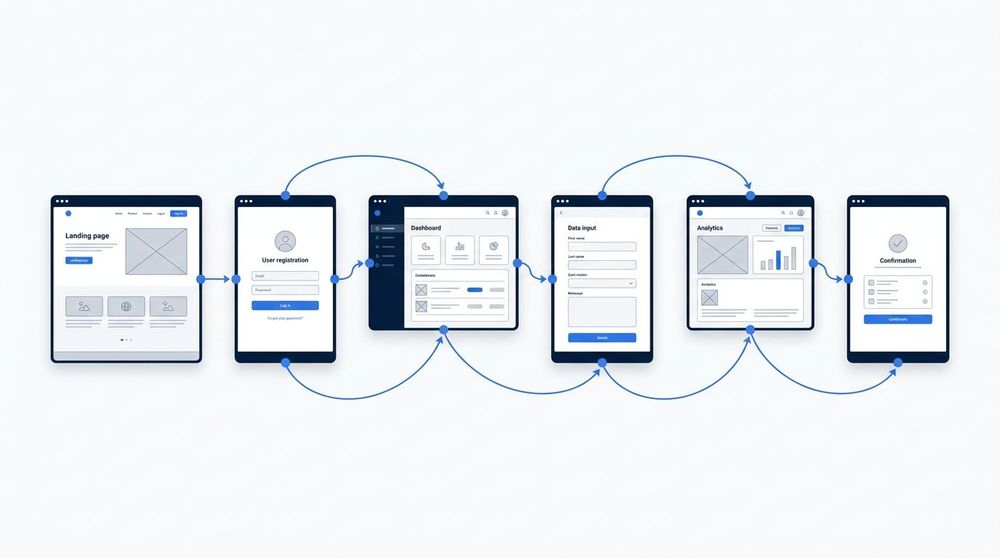
Marvel's core prototyping workflow starts with static screens—designs imported from Sketch, Figma, or uploaded directly as image files. Designers define hotspots on each screen and connect them to target screens, specifying transition animations such as slide, fade, or push. The result is a clickable prototype that a user can navigate as if it were a real application. No code is written at any stage; the entire flow is assembled through a visual editor, making iteration fast and accessible to non-developers.
Marvel's core offering centers on rapid prototyping, allowing designers to transform static screens into interactive mockups without writing code. Hotspots can be placed on any element of an uploaded image or design file, linking screens together to simulate navigation flows and user journeys. The platform supports prototypes across multiple device types, including mobile, tablet, and desktop, making it possible to preview how an interface behaves in context. Once a prototype is built, it can be shared via a simple URL, enabling stakeholders and testers to interact with it directly in a browser or on a real device.
Beyond prototyping, Marvel includes a user testing feature that allows teams to collect recorded sessions of real users navigating a prototype, capturing clicks, navigation paths, and spoken feedback. The handoff feature automatically generates design specifications—including measurements, colors, and assets—from uploaded designs, giving developers accurate reference data without requiring manual documentation. Collaboration is built into the workflow: multiple team members can work within shared projects, leave comments, and manage design assets in a centralized space, reducing the friction typically associated with passing work between design and development teams.
One of Marvel's most cited strengths is its low barrier to entry. Designers can import static screens from tools such as Sketch or Photoshop and add interactions within minutes, without writing any code. This makes it particularly well-suited for teams that need to validate ideas quickly or present interactive concepts to stakeholders early in the design process. The turnaround from static mockup to clickable prototype is significantly faster than in code-based workflows.
Marvel also benefits from a straightforward collaboration model. Prototypes can be shared via a URL, allowing clients, product managers, and developers to view and comment on flows directly in a browser without installing additional software. Its built-in user testing feature allows teams to collect recorded sessions from real participants, which brings lightweight usability research into the same platform as the design work.
On the limitations side, Marvel's interaction model is relatively constrained compared to code-based prototyping tools or more advanced design environments. Complex animations, conditional logic, and data-driven interactions are either unsupported or require significant workarounds. Teams building prototypes that need to simulate dynamic content, multi-step logic, or device-specific behaviors will often find Marvel insufficient for those scenarios.
Marvel is also less suited for projects where high-fidelity motion design is a central requirement. Its animation capabilities are limited to basic transitions between screens rather than fine-grained control over individual element movement or timing curves. For teams whose work is heavily interaction-driven—such as those designing gesture-based mobile experiences or complex dashboard micro-interactions—a more capable tool is typically necessary.
Comparison of Marvel against common prototyping and UI design tools across key practical criteria.
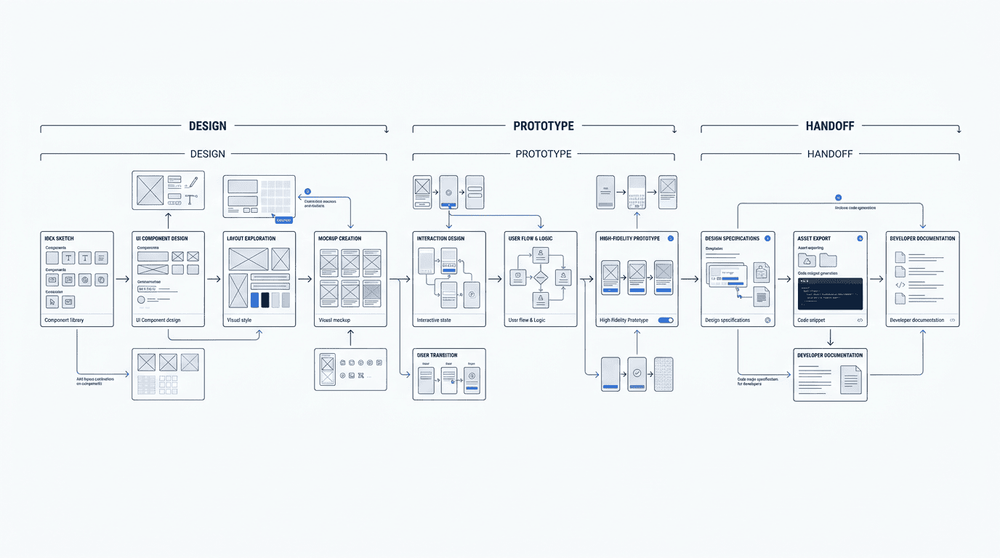
Marvel is most commonly used at three points in the product development cycle: early-stage validation, where rough wireframes help teams test ideas before committing engineering resources; stakeholder presentations, where clickable prototypes communicate intent more clearly than static mockups; and developer handoff, where design specs and assets can be exported directly from the platform. Each of these use cases relies on Marvel's speed—the ability to go from idea to testable prototype without a steep tooling overhead.
Marvel occupies a well-defined niche in the product design landscape: an accessible prototyping platform that lowers the barrier to turning static designs into interactive, testable experiences. Its browser-based environment, straightforward linking tools, and built-in user testing features make it a practical choice for teams that need to validate ideas quickly without committing to high-fidelity implementation. Because it integrates with widely used design tools and supports handoff workflows, Marvel fits naturally into the space between early-stage ideation and front-end development.
For teams working iteratively, Marvel's value lies in its ability to compress the feedback loop between designers, stakeholders, and developers. Prototypes can be shared, tested, and revised without requiring engineering involvement, which keeps design decisions grounded in observed user behaviour rather than assumption. While it is not a substitute for more complex animation tools or full-scale design systems platforms, Marvel serves its intended purpose reliably — helping teams move from concept to validated prototype with minimal friction.
