Technologies
Zeplin

Zeplin is a design handoff and collaboration platform that connects design tools—such as Figma, Sketch, and Adobe XD—to the development workflow. When a designer exports screens or components to Zeplin, the platform automatically extracts measurements, spacing values, typography details, color codes, and asset specifications, making them available to developers in a structured, browsable format. This reduces the back-and-forth that typically occurs when developers try to interpret design files directly, and provides a single shared reference point for both disciplines throughout a project.
Rather than replacing a design tool, Zeplin sits downstream of it, acting as a dedicated environment for handoff and review. Developers can inspect individual elements to retrieve CSS snippets, Android or iOS code hints, and exact measurements without needing access to the original design application. Teams can annotate screens, leave comments, and track the status of individual components, giving product managers and QA engineers visibility into what has been implemented and what remains in progress.
Zeplin was founded in 2015 by a small team of designers and developers who experienced firsthand the friction in handing off design work to engineering. The tool launched as a focused solution to a specific pain point: translating static design files into actionable specifications that developers could work from directly, without relying on informal annotations or repeated back-and-forth conversations. It gained early traction among product teams working in Sketch, which was at the time becoming the dominant UI design tool in the industry. Zeplin was acquired by Marvel in 2022, though it has continued to operate as a distinct product under that ownership.
Over time, Zeplin expanded its integration support beyond Sketch to include Figma, Adobe XD, and Photoshop, which broadened its appeal as design tooling diversified across teams. The product also evolved from a pure inspection tool into a more collaborative platform, adding features for organizing design components into styleguides and connecting them to reusable assets across projects. By the late 2010s, Zeplin had established itself as a widely adopted handoff layer in product workflows at companies ranging from small startups to large enterprise teams.
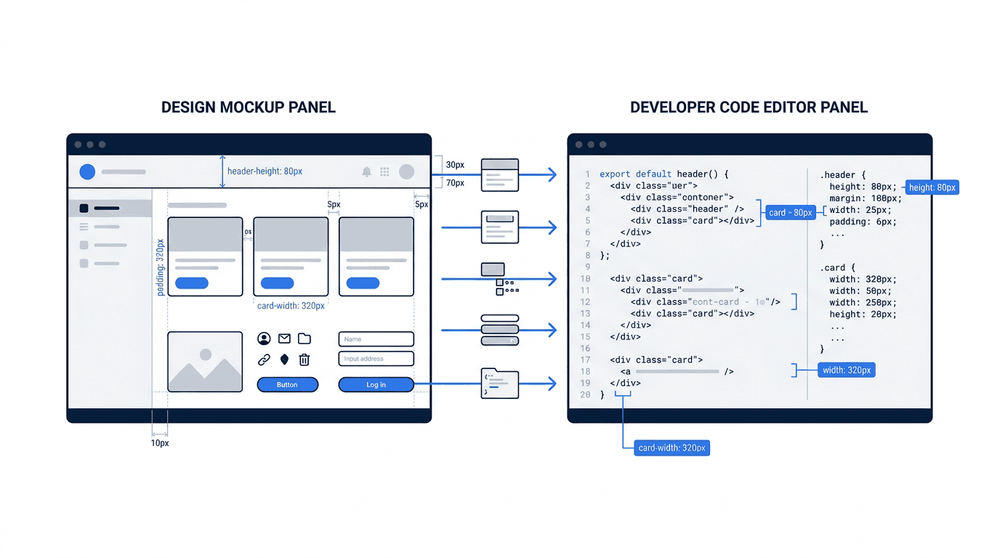
A designer exports a completed screen from Figma or Sketch directly into Zeplin, where the assets are automatically organized into a shared project. Developers then open that project to inspect spacing, typography, colors, and exportable assets—without needing access to the original design file. This one-way flow keeps design and development in sync while reducing the back-and-forth that typically slows delivery.
Zeplin's primary function is to extract and present design specifications directly from design files, eliminating the need for designers to manually document measurements, colors, and typography. When a design is imported, Zeplin automatically generates precise values for spacing, dimensions, font sizes, and color codes in formats that developers can use immediately. It also produces code snippets for CSS, Swift, Kotlin, and other languages, giving front-end and mobile developers a practical starting point rather than forcing them to translate visual properties into code by hand.
Beyond individual screens, Zeplin organizes shared visual decisions into a style guide that documents the design system's colors, text styles, and spacing tokens in one place. Teams can also define component libraries, linking reusable UI components to their corresponding design representations so that developers can quickly reference how a button, card, or form field should behave and appear across the product. This combination of per-screen specs and system-level documentation makes Zeplin useful both for delivering individual features and for maintaining consistency at the product scale.
One of Zeplin's most significant advantages is the way it reduces the back-and-forth between designers and developers. By automatically extracting CSS properties, spacing values, typography specs, and color tokens directly from imported design files, Zeplin eliminates much of the manual redlining work that historically consumed both sides of a handoff. Developers can inspect any element and retrieve accurate, implementation-ready values without waiting on a designer to annotate every detail.
Zeplin also centralizes design assets and documentation in one place, which is particularly valuable on larger teams or projects with multiple contributors. Style guides generated from design files keep color palettes, text styles, and components in sync, making it easier to maintain consistency across a product over time. The ability to attach written notes and annotations directly to specific screens or components means context travels with the design rather than getting lost in separate threads or emails.
On the limitations side, Zeplin is primarily a handoff and documentation tool, not a design tool — it relies entirely on exports from Figma, Sketch, or Adobe XD, so any workflow disruption upstream will affect what developers see in Zeplin. Teams working in tools that Zeplin does not support will find the integration story weak or absent. Additionally, Zeplin's free tier is limited to a single project, and scaling to larger team usage requires a paid subscription, which can be a meaningful cost consideration for smaller organizations.
Some teams also find that Zeplin introduces a form of version fragmentation if discipline around re-exporting updated designs is not enforced. When designers update screens but do not push new exports to Zeplin promptly, developers may be working from stale specs without realizing it. This is less a technical flaw than an organizational challenge, but it is a genuine risk in fast-moving projects where design and development iterate in parallel.
Comparison of Zeplin against common design handoff tools across integration model, core handoff features, and key limitations.
Zeplin is most widely adopted by product teams that work with design tools such as Sketch, Figma, or Adobe XD and need a reliable handoff layer between design and engineering. It fits naturally into organizations where designers produce high-fidelity UI mockups and developers need accurate measurements, color values, typography specs, and asset exports without going back and forth over email or chat. Teams building web applications, mobile apps for iOS and Android, or cross-platform products are the most frequent adopters, since those contexts involve both a distinct design phase and a separate implementation phase where specification accuracy matters.
Zeplin is particularly effective in cross-functional teams where product managers, designers, and engineers all need a shared reference for what is being built. Rather than each stakeholder relying on their own interpretation of a design file, Zeplin provides a single source of truth that all roles can access and annotate. This makes it a common choice in agencies handling client projects, as well as in-house product teams at companies with dedicated design and engineering functions working in parallel.
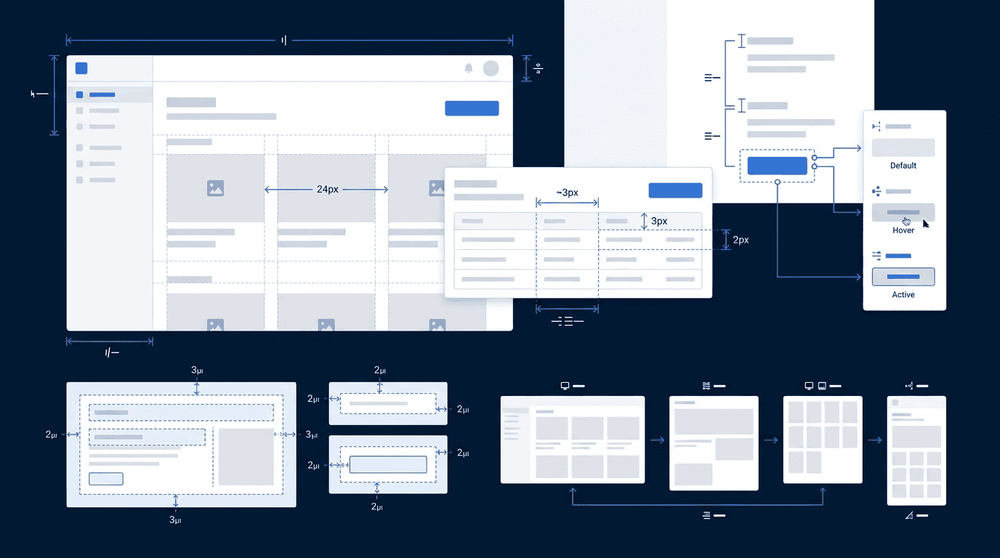
Zeplin's spec view presents each design layer with precise measurements, spacing values, typography details, and color codes displayed directly alongside the component. Developers can inspect any element without switching tools, and copy generated CSS, Swift, or Android code snippets with a single click. This reduces the back-and-forth between designers and developers that typically accompanies a handoff, making the documented intent of the design immediately actionable.
Zeplin is a design handoff and collaboration platform that bridges the gap between design and engineering teams. It takes design files from tools like Figma, Sketch, and Adobe XD and transforms them into a structured reference environment where developers can inspect spacing, typography, colors, and assets without needing direct access to the original design application. By centralizing this information and pairing it with annotation, versioning, and style guide features, Zeplin reduces the back-and-forth that typically slows down implementation and keeps both teams aligned on a shared source of truth.
In the modern product development workflow, Zeplin occupies the space between design completion and front-end implementation—a stage that is often informal and error-prone without dedicated tooling. Teams that integrate Zeplin into their process gain a consistent, inspectable record of design decisions that persists across the full lifecycle of a product, from initial build through ongoing iteration. For organizations managing multiple products or large component libraries, its style guide and design system support make it particularly well-suited to maintaining visual consistency at scale.