Technologies
Docker

Docker is an open-source platform that enables developers to package applications and their dependencies into lightweight, portable units called containers. Each container bundles everything an application needs to run—code, runtime, libraries, and configuration—into a single, self-contained unit that behaves consistently regardless of the underlying environment. Because containers share the host operating system's kernel rather than emulating an entire machine, they start faster and consume fewer resources than traditional virtual machines.
Developers use Docker primarily to eliminate the "works on my machine" problem: an application packaged as a Docker container runs identically in a local development environment, a continuous integration pipeline, and a production server. Docker achieves this by isolating each container's filesystem and processes from the host system and from other containers, while still allowing fine-grained control over networking, storage, and resource limits. Since its public release in 2013 by Docker, Inc., the platform has become a foundational tool in modern software delivery workflows, underpinning broader ecosystems such as container orchestration platforms like Kubernetes.
Docker was created by Solomon Hykes and released in March 2013 as an open-source project by the company dotCloud, a platform-as-a-service provider. The initial release was demonstrated at PyCon 2013, where it quickly attracted attention from developers looking for a more consistent way to package and ship applications. dotCloud later renamed itself Docker, Inc. to reflect the product's growing importance and the company's new direction.
Although Linux containers had existed for years—through technologies such as LXC (Linux Containers) and kernel features like namespaces and cgroups—Docker made them significantly more accessible by introducing a straightforward command-line interface and a portable image format. This abstraction allowed developers to define an application's environment once and reproduce it reliably across development, testing, and production systems. The introduction of the Docker Hub registry in 2013 further accelerated adoption by giving teams a central place to publish and share container images, effectively establishing a new standard for distributing software.
At the core of Docker is the distinction between images and containers. An image is a read-only, layered template that contains everything needed to run an application — the operating system base, runtime, libraries, and application code. A container is a running instance of that image: an isolated process that shares the host kernel but operates in its own filesystem and network namespace. Images are built from a Dockerfile, a plain-text file that describes each step of the environment setup, such as which base image to start from, which packages to install, and which command to execute on startup.
When a developer runs docker build, the Docker daemon — a background service running on the host — reads the Dockerfile and assembles the image layer by layer, caching intermediate steps to speed up subsequent builds. Running docker run then instructs the daemon to create and start a container from that image, applying any specified port mappings, volume mounts, or environment variables. The container lifecycle moves through created, running, paused, and stopped states, and containers can be removed once they are no longer needed, leaving no persistent state behind unless explicitly written to an attached volume.
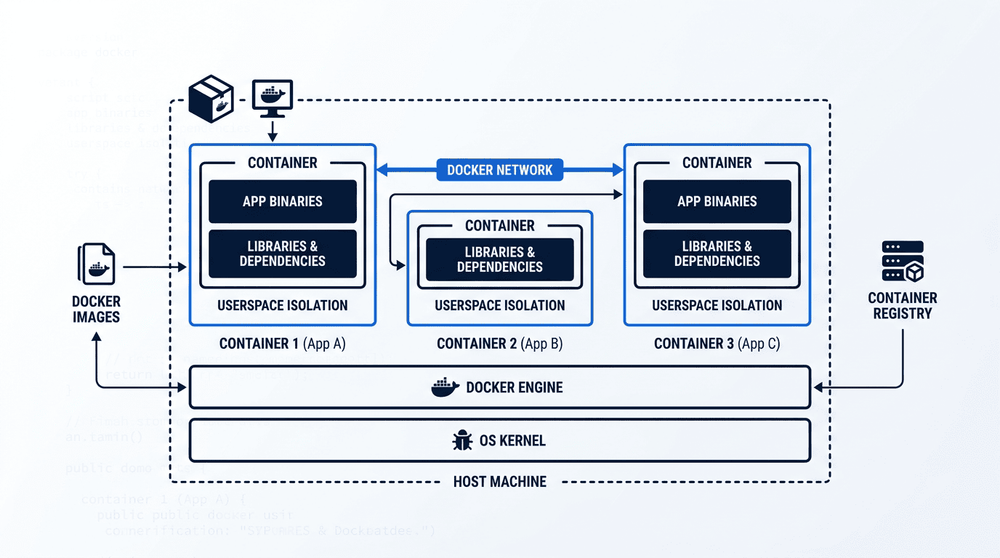
Docker operates through three core components: the client, the daemon, and the registry. The client issues commands via the Docker CLI, which communicates with the daemon—a background process that manages images, containers, networks, and volumes on the host. Images are read-only templates pulled from a registry such as Docker Hub, while containers are the live, running instances created from those images. Understanding how these components interact is essential to working with Docker effectively.
One of Docker's most cited strengths is portability. Because a container packages the application together with its dependencies and runtime environment, the same image runs consistently across a developer's laptop, a CI/CD pipeline, and a production server—eliminating the classic "it works on my machine" problem. This consistency reduces environment-related bugs and shortens the feedback loop between development and deployment.
Docker also improves resource efficiency compared to traditional virtual machines. Containers share the host operating system kernel rather than each running a full guest OS, which means they start in seconds and consume significantly less memory and disk space. This makes it practical to run many isolated services on a single host, and it accelerates deployment pipelines because images can be built, pushed, and pulled quickly.
On the disadvantage side, Docker introduces performance overhead that, while small in most cases, can matter for I/O-intensive or latency-sensitive workloads. The container networking stack and the layered filesystem add indirection that bare-metal deployments do not have. Additionally, security is a real concern: containers share the host kernel, so a kernel vulnerability or a misconfigured container with excessive privileges can potentially affect the entire host. Running containers as non-root users and applying image scanning are important mitigations, but they require deliberate effort.
At scale, Docker's operational complexity grows considerably. Managing dozens of containers across multiple hosts requires an orchestration layer such as Kubernetes or Docker Swarm, each of which carries its own learning curve and maintenance burden. Networking between containers, persistent storage, secret management, and logging all become non-trivial concerns that teams must plan for explicitly. For small or single-host deployments these issues are manageable, but organizations moving to large distributed environments should expect a meaningful investment in infrastructure expertise.
Comparison of Docker containers and traditional virtual machines across key operational dimensions. The right choice depends on isolation requirements, resource constraints, and deployment context.
One of Docker's most widespread applications is standardizing local development environments. By defining a project's runtime, dependencies, and configuration in a Dockerfile or Compose file, every developer on a team works against an identical environment regardless of their host operating system. This eliminates the classic "works on my machine" problem and reduces onboarding time, since a new team member can reproduce the full stack with a single command rather than manually installing and configuring each service.
Beyond local development, Docker is a foundational component of CI/CD pipelines and microservices architectures. In continuous integration workflows, build agents pull a known container image, run tests in an isolated environment, and discard the container afterward—ensuring reproducible build results across every run. In production, organizations running microservices use containers to package each service independently, allowing individual components to be deployed, scaled, or updated without affecting the rest of the system. Docker also enables cloud-agnostic application packaging: because a container image encapsulates everything the application needs, the same image can run on AWS, Google Cloud, Azure, or an on-premises server with no changes to the application itself.
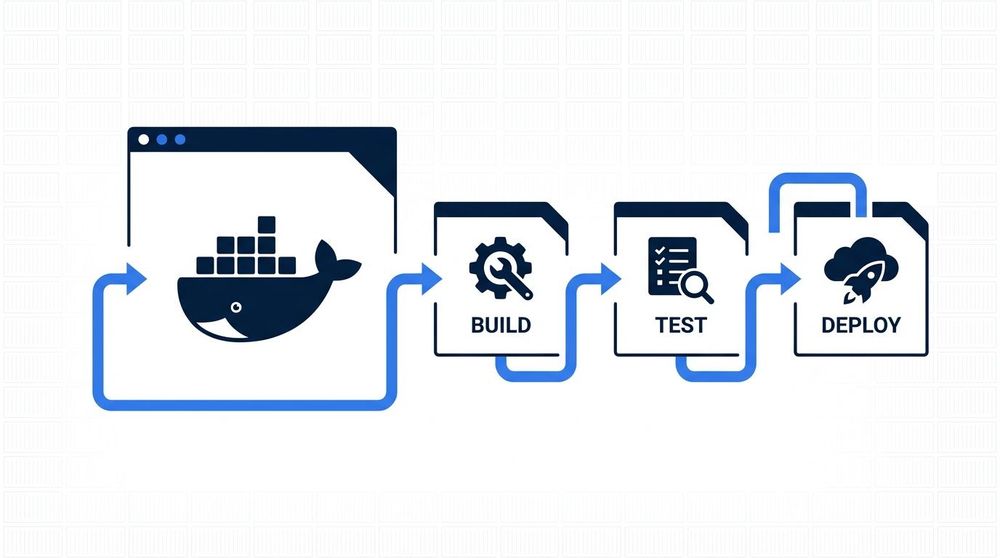
When a developer pushes code to a repository, a CI/CD pipeline can automatically trigger a Docker image build using the project's Dockerfile. The resulting image is tagged, tested, and pushed to a container registry such as Docker Hub or a private registry. From there, an orchestration layer—or a simple deployment script—pulls the image and runs it as a container in staging or production. This flow makes deployments reproducible: the same image that passed tests is exactly what runs in production.
Docker does not exist as a standalone tool in isolation — it is surrounded by a set of complementary projects that together form a broader ecosystem. Docker Compose is a tool for defining and running multi-container applications using a single YAML configuration file, making it straightforward to spin up interconnected services such as a web server, database, and cache with a single command. Docker Hub serves as the default public registry where developers can publish and pull container images, hosting both official images maintained by software vendors and community-contributed ones. This registry model is central to how Docker images are distributed and reused across projects and organizations.
For production workloads that span multiple machines, Docker alone is typically not sufficient — this is where container orchestration tools become relevant. Kubernetes is the most widely adopted orchestration platform; it manages the scheduling, scaling, networking, and self-healing of containers across a cluster of nodes. While Docker handles the lifecycle of individual containers on a single host, Kubernetes operates at a higher level, coordinating fleets of containers across infrastructure. Docker Swarm, Docker's own built-in clustering solution, offers a simpler alternative to Kubernetes but sees considerably less adoption in large-scale deployments.
Docker has become a foundational layer in modern software development, bridging the gap between writing code locally and running it reliably in production. By packaging applications and their dependencies into portable containers, it addresses one of the most persistent problems in software delivery: environment inconsistency. Its integration with orchestration platforms, CI/CD pipelines, and cloud infrastructure has made it a standard building block rather than an optional tool, present at nearly every stage of a typical development workflow.
While Docker is not without its tradeoffs — security configuration requires care, and orchestrating containers at scale introduces additional complexity — its adoption across teams of all sizes reflects the practical value it delivers. Understanding how Docker works, how images are built, and how containers are managed remains a relevant and durable skill for developers, platform engineers, and anyone involved in shipping software in 2024 and beyond.

When you ship a product, the infrastructure behind it matters as much as the code itself — but managing servers, deployment pipelines, uptime monitoring, and cloud configuration shouldn't pull your team away from building. We take ownership of the full hosting and cloud layer: provisioning environments, setting up CI/CD pipelines, configuring cloud services, and keeping everything running reliably in production. That means your team stays focused on the product, while we handle the operational complexity that comes with running software at scale. Whether you're launching something new or moving an existing system to a more resilient setup, we work with you to choose the right infrastructure for your actual requirements — not the most fashionable one.

Every application your users interact with — whether a mobile app, a web platform, or a dashboard — runs on a backend that most people never see. The backend handles the logic, the data, the authentication, the integrations, and the rules that make a product actually work. When it is built well, it is invisible: fast, reliable, and easy to extend as requirements grow. When it is built poorly, it becomes the thing that limits everything else. At Nebulae, backend development is where we invest the most deliberate engineering effort — because getting the foundation right is what makes every layer on top of it trustworthy.